
SmarterWX Automate supports dynamic scaling of your asset maps, where maps are scaled based on the size of the dig site request area. This ensures more enquirers receive a meaningful response to a large dig site enquiry.
Dynamic scaling
Your automated responses can be configured to make use of dynamic scaling. This increases the response rate for large dig site enquiries by generating asset maps at an appropriate scale based on the request.
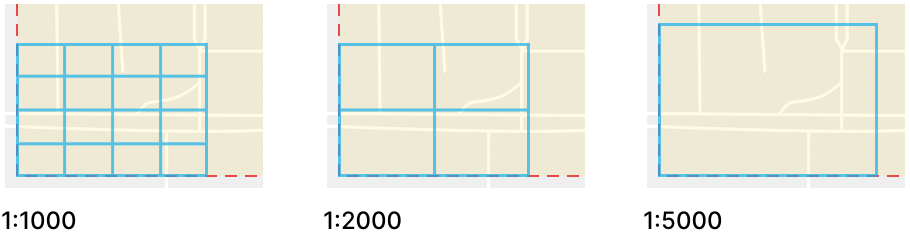
SmarterWX Automate’s default minimum scale ratio for asset maps is 1:1000, but this can be set to 1:2000, or 1:5000 depending on your preference. This value represents the minimum scale an asset map will be generated at. The system will automatically find the best fit based on the enquiry area, ensuring plans are generated with the maximum detail.
Note Asset maps are currently limited to 16 pages to keep within third party email systems’ 10MB file size limit. SmarterWX Automate will first attempt to generate your asset map at 1:1000, then try again at 1:2000, and finally 1:5000 until the response fits within the 16 page limitation.
To enable dynamic scaling
Follow the simple steps to enable dynamic scaling:
- Upload a compatible map as part of your map configuration
- Select the minimum scale for your responses
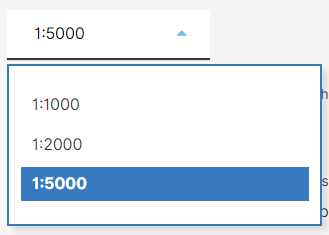
- Make your new configuration active.
Upload a compatible map
To use this feature you must upload a compatible map that supports a dynamic scale response. The map needs to include DynamicScaleMessage and DynamicScaleText elements. If these elements do not not exist in the map, the minimum scale ratio option is greyed out. Please contact Support if you require help to set up the dynamic scale response feature.