
SmarterWX Locate allows you to store a permanent hyperlink (permalink) to provide quick access to an enquiry and its responses. Permalinks are designed to be stored in other applications (such as a work order system) or shared by email with colleagues.
Anyone with access to the permalink can view the enquiry. Users do not need to login to SmarterWX Locate to view the responses when shared via permalinks.
Enabling Permalinks
The permalink feature must be enabled in your SmarterWX Locate organisation, To enable permalinks an Administrator must go to the Settings->Configuration page and select the “Enable enquiry permalinks” checkbox.

Using Permalinks
Follow these steps to create a permalink for your enquiry:
Navigate to the Desired Enquiry
- Open the SmarterWX Locate application and navigate to the enquiry.
- Click to view the details of the enquiry.
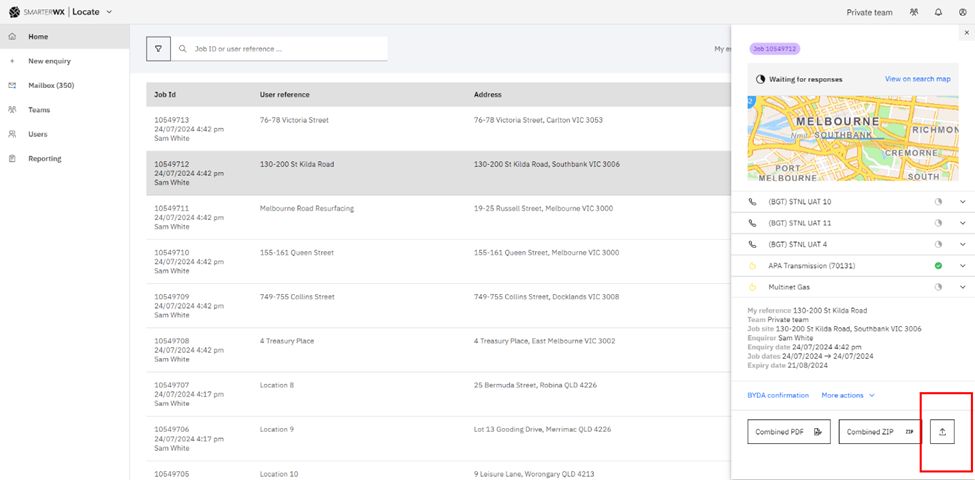
Share the Enquiry
- Click on the “Share” icon located next to the “Combined ZIP” button.
- The URL will be displayed on the screen. You can then copy this URL to your clipboard and store it into your business system or share it with another user.

Revoking Permalinks
Once shared a permalink is available for anyone with the link forever. You can revoke all permalinks in use by your organisation in the Settings->Configuration page by clicking on the “Remove permalinks in use” button.
This will block all permalinks that have been created for your organisation.